
Creating your account
Sign up, choose a role, and finish onboarding.
Every Kolfly account starts with the same email-first sign-in flow, followed by a short registration step and an onboarding flow that sets up your Brand or Creator profile.
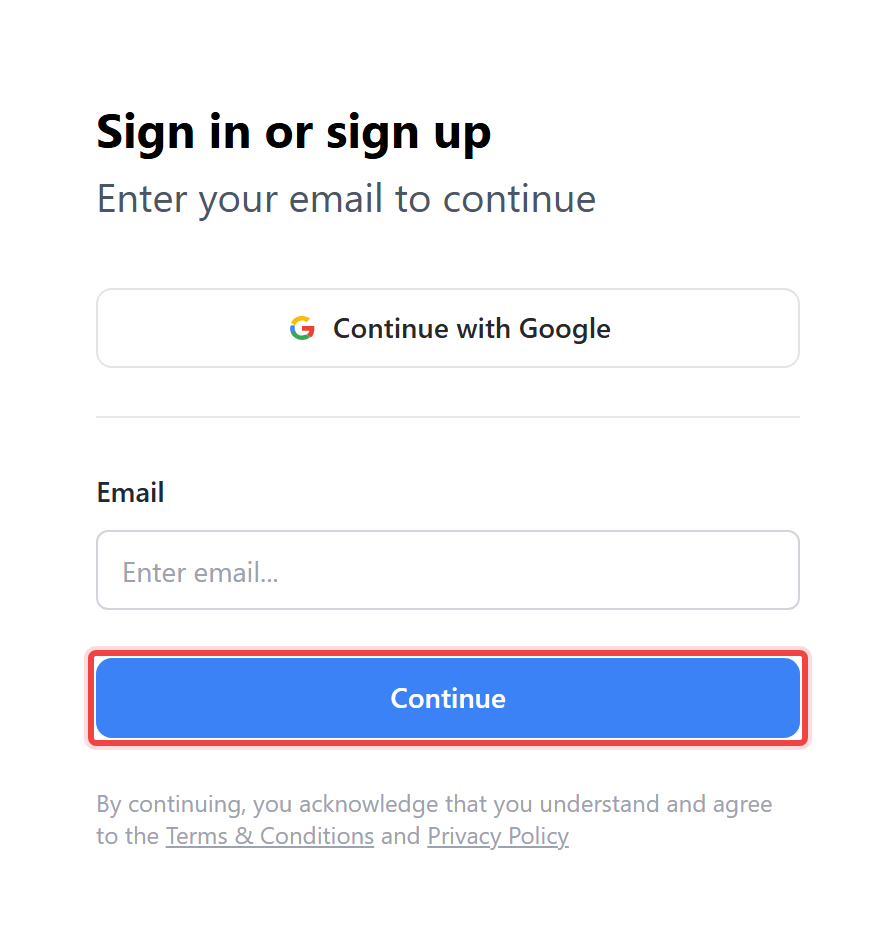
Signing in with your email
Kolfly does not ask you to choose "sign up" or "log in" separately. You enter your email, and Kolfly decides what to show you next based on whether that email already has a password.
- Enter your email address and select Continue.
- If the email already has a password, you land on "Welcome back. Enter your password". Enter it and select Sign In.
- If the email does not have a password yet, Kolfly emails you a verification code and shows "Enter the code we emailed you". Enter the code and select Verify and Continue.
- If you did not receive the code, select Resend code. This button has a 60-second cooldown and shows "Resend in N seconds" until it is ready again.
Setting a password instead of a code
From the code step, you can select Use a password instead. This takes you to "Create your account", where you enter Full Name, Password, and Confirm Password, then select Create Account.
Your password needs at least 8 characters, including one uppercase letter, one lowercase letter, one number, and one symbol.
Signing in with Google
If the deployment has Google sign-in configured, a Continue with Google button appears on the email step.
Invite-only deployments
Some Kolfly deployments only accept new users with an invitation code. On these deployments, the email step shows a hint: "New here? You'll need an invitation code after this step to access the platform." Whether a code is required is a setting controlled by the deployment, not something you choose.
Completing your registration profile
The first time you sign in, Kolfly asks you to fill in a profile before you can continue:
- Full Name (required)
- Timezone (required; defaults to your browser's timezone)
- Brand Niche (required)
- Website (required; enter a full URL)
- Company Profile / Description (required)
- Target Audience (optional)
Select Save and Continue once the required fields are filled in.
Onboarding
After your profile is saved, Kolfly walks you through onboarding. On an invite-only deployment, the order is: redeem your invitation code, choose your role, answer questions for that role, then a done screen. On an open deployment, the redeem step is skipped automatically.
Redeeming an invitation code
This step only appears on invite-only deployments. The screen reads "You'll need an invitation code", with the subtitle "Kolfly is invite-only. Enter the code you received to continue."
- Enter your code in the "Invitation code" field. Codes follow the format INV-XXXXXXXXXX and are uppercased automatically as you type.
- Kolfly validates the code as you type. If it is not valid, you will see one of: "This code does not exist", "This code is no longer active", "This code has expired", "This code has already been used", or "You cannot redeem your own code".
- Select Redeem & Continue.
If you do not have a code, the footer explains: "Don't have a code? Ask a current Kolfly user. Every member can share one invite to anyone."
Choosing your role
The next screen asks "Who are you?" with two options:
- Brand — "I'm hiring creators for campaigns and want to discover KOLs."
- Creator — "I create content and want to connect with brands."
Setting up a Brand profile
Brand onboarding has two steps.
Step 1, "Tell us about your business", collects Company name (required), Your role at the company, Industry (required), Company size (1-10, 11-50, 51-200, 201-1000, or 1000+), and a brief company description.
Step 2, "What's your budget per creator?", asks you to choose a Currency (USD or IDR) and set a budget range on a slider. The USD range runs $50 to $50,000 in $50 steps. The IDR range runs Rp100,000 to Rp100,000,000 in Rp100,000 steps.
Select Finish registration to complete Brand onboarding.
Setting up a Creator profile
Creator onboarding has three steps.
Step 1, "Tell us about you", collects Display name (required), Age, Gender, Location, and "Your niches" as a multi-select.
Step 2, "What kind of brands do you want to work with?", is optional and has two industry selectors: "I'd love to work with" and "Not interested in".
Step 3, "What's your rate range?", asks you to choose a Currency and set a rate range on a slider. The USD range runs $20 to $20,000 in $20 steps. The IDR range runs Rp50,000 to Rp50,000,000 in Rp50,000 steps.
Select Finish registration to complete Creator onboarding.
Finishing up
Onboarding ends on a "You're in!" screen. It shows your own invite code, which you can copy with Copy code, or share with Share on X or Share on WhatsApp. Select Continue to enter Kolfly.