
Payouts
Track your balance and withdraw your earnings.
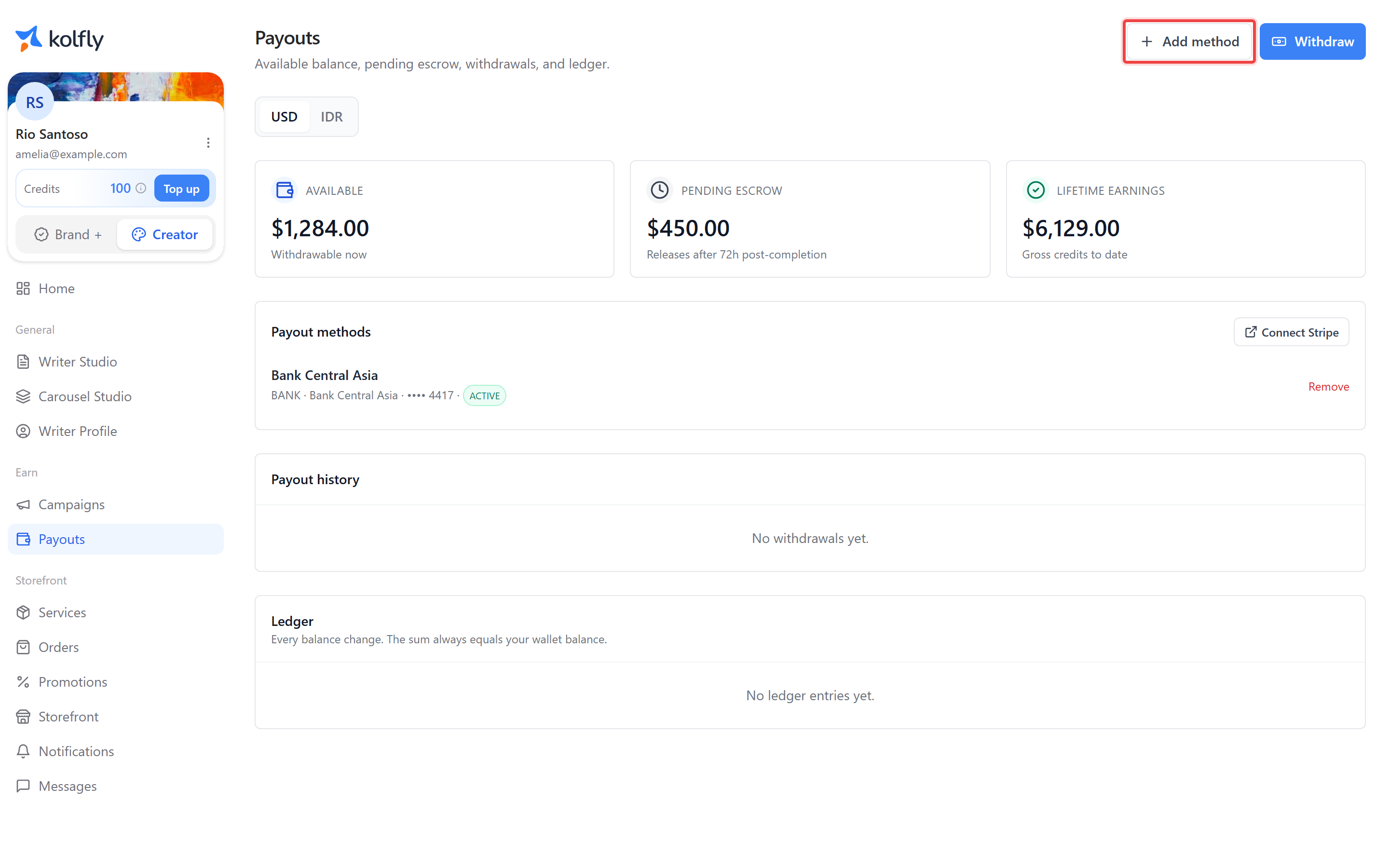
Payouts, at /creator/monetize/payouts, is where you track your balance and withdraw what you've earned. The header reads "Available balance, pending escrow, withdrawals, and ledger." This page covers everything from your first payout method to reading a line in your ledger.
Two actions sit at the top of the page: Add method, for setting up how you get paid, and Withdraw. Withdraw stays disabled until you have an active payout method for the currency you're viewing and a balance above zero.
Switching currencies
A currency switcher lets you move between USD and IDR. This only changes which wallet you're viewing — Kolfly does not convert between currencies. Each currency is a separate balance, so earnings in USD stay in USD and earnings in IDR stay in IDR.
Your balance at a glance
Three cards summarize your money:
| Card | Meaning |
|---|---|
| Available | "Withdrawable now" |
| Pending escrow | "Releases after 72h post-completion" |
| Lifetime earnings | "Gross credits to date" |
"Credits" in Lifetime earnings means accounting entries recorded against your account, not Kolfly AI credits used elsewhere in the app. Don't confuse the two figures — this card tracks money earned, while your sidebar credit balance tracks a separate spending allowance.
Upcoming releases
This section lists each order still in escrow, showing its amount and when it will release into your available balance.
Payout methods
How you add a payout method depends on your currency:
- For IDR, add an Indonesian bank account.
- For other currencies, select Connect Stripe.
These options are mutually exclusive per currency — you use a bank account for IDR and Stripe for everything else. If Stripe isn't available for your account yet, you'll see: "Stripe payouts are not available yet. Please add a bank account instead, or check back soon". Select Add method from the top of the page to start either setup.
Each payout method has a status:
| Status | Meaning |
|---|---|
| PENDING | Verification in progress |
| ACTIVE | Ready to receive withdrawals |
| RESTRICTED | Blocked, with a reason shown |
| REMOVED | No longer usable |
If you have a balance but no payout method for that currency, Kolfly prompts you to connect a verified method before you can withdraw.
Withdrawing your balance
Select Withdraw once it's enabled. The withdraw form shows the minimum withdrawal amount for your currency, which Kolfly sets and may vary by currency. Check this figure before requesting a withdrawal, especially if your available balance is small.
A payout you request moves through these statuses:
| Status | Meaning |
|---|---|
| REQUESTED | You've asked for the withdrawal |
| PROCESSING | Kolfly is sending the funds |
| PAID_OUT | The funds have reached you |
| FAILED | The withdrawal didn't go through |
| CANCELLED | You cancelled it |
| REVERSED | The payout was reversed after being sent |
You can cancel a payout while it's still in REQUESTED status. Once it moves to PROCESSING, you can no longer cancel it from the page.
Payout history
This section lists your past payouts with their date, amount, method, and status. Each row offers Cancel, if the payout is still REQUESTED, or Receipt, to download a record of a completed one.
Ledger
The ledger lists every event that changed your balance, in order. Entry types include:
- Order paid
- Escrow released
- Pending debit
- Withdrawal
- Withdrawal refunded
- Refund hold
- Dispute hold
- Dispute released
- Clawback
- Adjustment
Use the ledger when a balance figure looks unfamiliar — it's the full history behind the number. Each entry ties back to a specific order, withdrawal, or adjustment, so you can trace exactly where a change in your balance came from.
When your balance can go negative
Your available balance can go negative if a refund happens after the related escrow has already released to you. When that happens, Kolfly takes the amount owed from your future earnings rather than billing you directly. Watch your ledger for a refund-related entry if your available balance drops unexpectedly.
Credit cost
Viewing and managing payouts does not cost credits.