
Usage and billing
Track credit use, change plan, and buy top-ups.
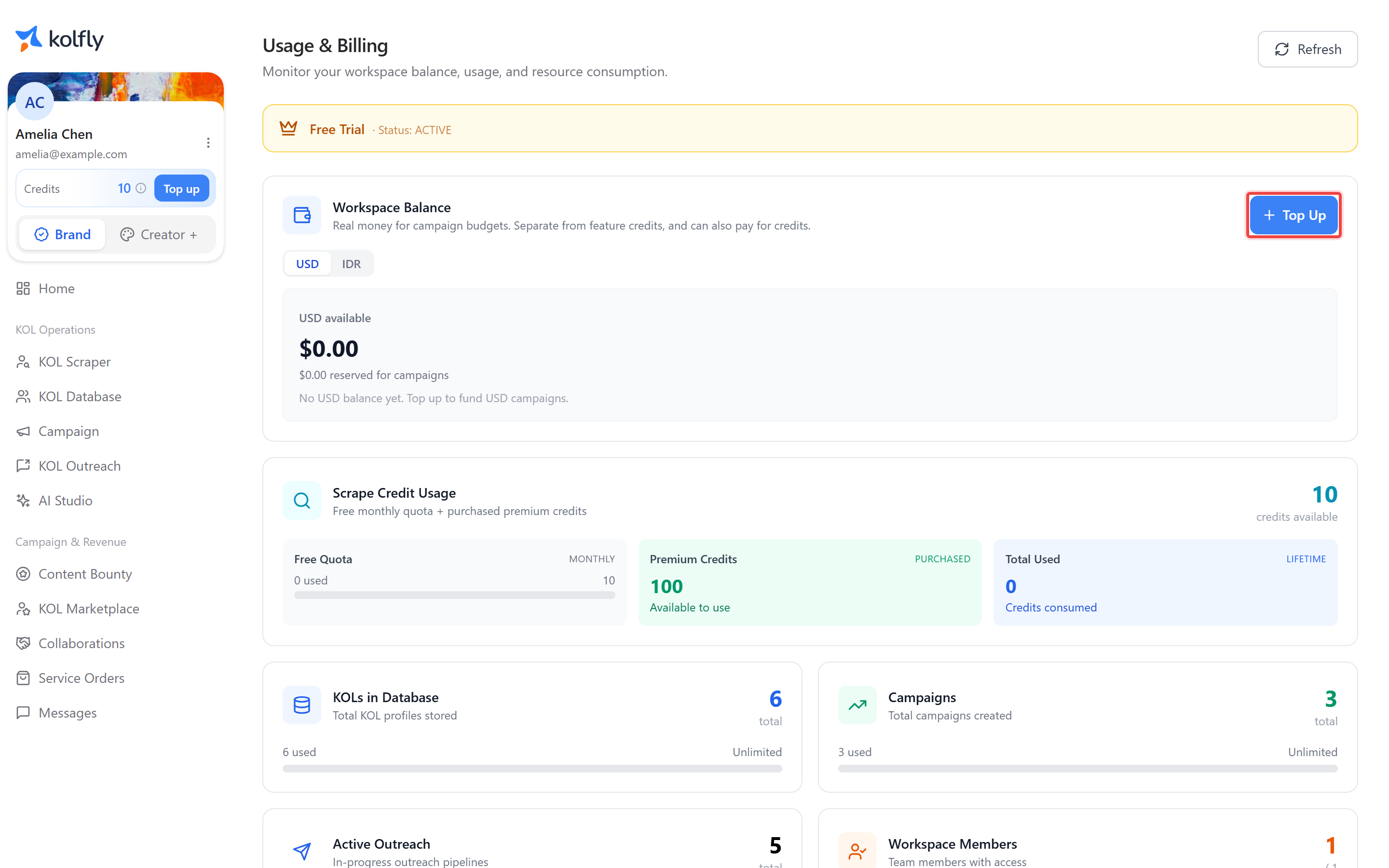
The Usage & Billing page, at /usage in Brand mode, is where you monitor your workspace balance, usage, and resource consumption. Use it to check whether you have enough budget and credits before starting a new campaign or scraping run.
What the page shows
Subscription
The page shows your current subscription tier and its status, so you can confirm at a glance which plan your workspace is on before checking whether a given limit applies to you.
Workspace balance
A workspace balance panel shows your available balance with a top-up action. This balance is real money you spend on campaign budgets, held in either USD or IDR. It is separate from feature credits, though you can also use it to pay for credits.
Topping up uses Stripe for USD balances and a payment gateway for IDR balances. You enter any amount you want to add — there are no fixed packs for topping up your workspace balance, so you can add exactly what you need for an upcoming campaign.
Keep in mind that this balance funds the money you pay out to creators through campaigns, which is a different pool from the credits described below.
Scrape Credit Usage
The "Scrape Credit Usage" card shows the credits that KOL Scraper spends, broken down into:
- Total available
- Free Quota — used against a monthly limit
- Premium Credits — credits you purchased
- Total Used — a lifetime figure
Usage stats
A stats grid shows your usage against your plan's limits across four resources:
- KOLs in Database
- Campaigns
- Active Outreach
- Workspace Members
Buying scraping credits
Select Purchase Credits to open the "Purchase Credits" page, described as "Buy premium KOL scraping credits that never expire".
The packages and prices there come from Kolfly's servers, so that page always shows current options. Premium credits do not expire, so buying ahead of a busy month carries no risk of losing them.
Your Free Quota is the part that resets each month.
When you run out
If a metered action would exceed your quota, Kolfly shows a Quota Exceeded dialog. It names the resource that ran out — AI Credits, Discovery Profiles, or Image Generations — and tells you how much of your limit you have used this billing period.
From this dialog you can buy a credit pack without leaving what you were doing.
| Pack | Price |
|---|---|
| 1,000 credits | $15 |
| 5,000 credits | $60 |
| 15,000 credits | $165 |
You can also select Upgrade Plan to raise your monthly quota, or Dismiss to close the dialog. Dismissing leaves the action that triggered it uncompleted.
Usage in Creator mode
Creator mode has its own equivalent page, "Usage & Credits", covering the credits and limits relevant to creator features. This is covered separately in the creator section of the documentation.